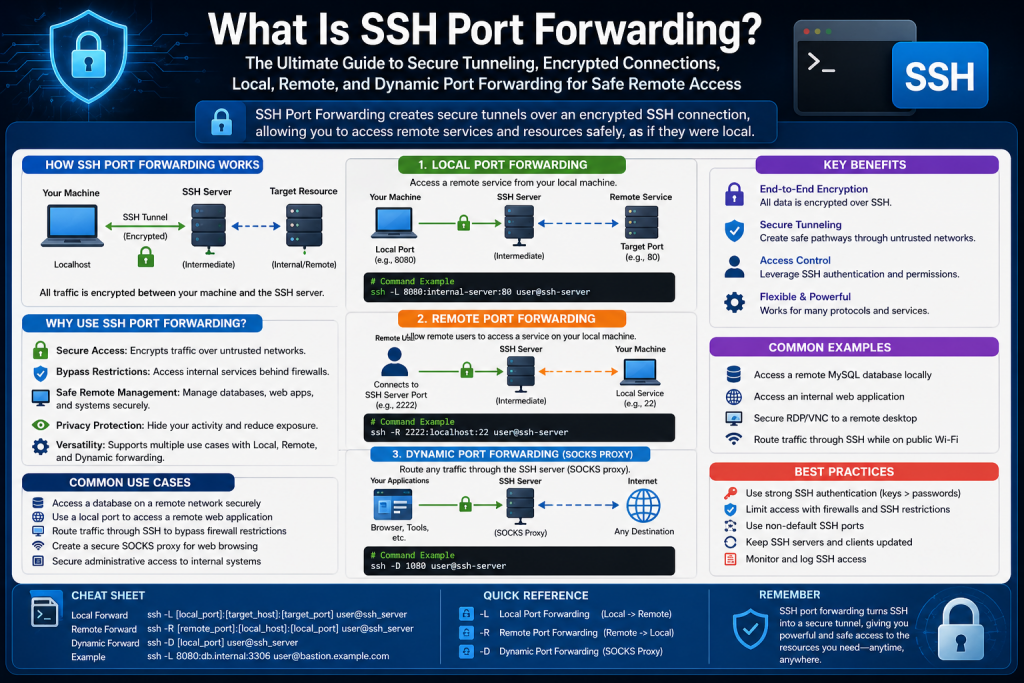
SSH port forwarding is one of the most practical and powerful tools in modern networking for creating secure communication pathways between systems. It combines the protective capabilities of Secure Shell (SSH) with network tunneling techniques to safely transport data through encrypted channels. In an era where remote work, cloud services, distributed teams, and cybersecurity concerns dominate IT infrastructure, SSH port forwarding has become an essential skill for administrators, developers, cybersecurity professionals, and advanced users.
At its core, SSH port forwarding allows users to securely redirect traffic from one machine to another through an encrypted SSH connection. Instead of exposing sensitive services directly to the internet, SSH creates a protected tunnel through which data can pass privately. This is especially useful when accessing remote servers, internal company resources, development environments, or restricted services.
To understand this concept, imagine a private underground tunnel connecting your home directly to a secure office building. Instead of traveling through public roads where anyone can observe or interfere, you move through a guarded path that only authorized individuals can use. SSH port forwarding works similarly by encrypting traffic and hiding it from unauthorized observers.
This secure tunneling method protects data from interception, improves privacy, and enables remote users to interact with systems as though they were physically present on the same local network.
What SSH Is and Why It Matters
Secure Shell, commonly known as SSH, is a cryptographic network protocol designed for secure communication over unsecured networks. It was originally developed to replace older remote-access tools that transmitted data in plaintext, making them vulnerable to interception.
SSH primarily uses port 22 by default and provides encrypted communication between a client device and a remote host. Through SSH, users can remotely log in to systems, execute commands, transfer files, manage servers, and create secure tunnels for network traffic.
SSH matters because it provides three major security benefits:
- Encryption of transmitted data
- Authentication of users and servers
- Integrity protection to prevent tampering
Without SSH, sensitive credentials and commands could be intercepted by malicious actors. SSH transformed remote system administration by making internet-based access dramatically safer.
SSH port forwarding extends this security by allowing not just shell sessions, but other network traffic to move securely through the SSH connection.
The Basic Concept Behind Port Forwarding
Before diving deeper into SSH port forwarding specifically, it helps to understand standard port forwarding.
Traditional port forwarding is a networking technique that directs incoming or outgoing traffic from one IP address and port number to another, allowing devices or services behind routers, firewalls, or network gateways to communicate with external systems. It is commonly used to make internal resources—such as web servers, gaming servers, CCTV systems, or remote desktop services—accessible from outside a private network. For example, a router may forward incoming traffic on port 80 to an internal web server hosting a website, enabling external users to reach that service.
While effective for accessibility, standard port forwarding often exposes selected services directly to the internet, which can significantly increase security risks if those services are poorly configured, unpatched, or weakly protected. Attackers frequently scan public IP addresses for open ports, searching for exploitable vulnerabilities. This is why administrators must carefully configure firewalls, authentication controls, and service hardening when using traditional forwarding methods. Standard port forwarding primarily focuses on connectivity and accessibility, not encryption or confidentiality.
Data passing through forwarded ports may remain unencrypted unless the underlying application secures it separately. Understanding this foundational concept makes SSH port forwarding easier to appreciate, because SSH adds encrypted tunneling, stronger authentication, and secure remote communication on top of the basic forwarding principle.
Every internet-connected service communicates through ports. Ports are virtual communication endpoints assigned to specific applications or services. For example:
- Port 80 is commonly used for HTTP
- Port 443 is used for HTTPS
- Port 22 is used for SSH
- Port 3389 is used for Remote Desktop Protocol (RDP)
When data reaches a machine, the port number helps determine which service should receive it.
Traditional port forwarding is usually configured on routers or firewalls to direct incoming traffic to a specific device within a private network. For example, if you want external users to reach a web server inside your office, your router can forward incoming traffic on port 80 to the server’s internal IP address.
While useful, standard port forwarding can expose services to attacks if not properly secured.
SSH port forwarding improves this by wrapping traffic inside an encrypted SSH session, drastically reducing exposure.
How SSH Port Forwarding Works
SSH port forwarding works by creating a secure tunnel between two machines. Instead of sending traffic directly to a target service over an open network, the traffic is encapsulated inside SSH encryption and delivered through a trusted SSH connection.
This process generally involves:
- A local machine (your computer)
- A remote SSH server
- A destination service
When configured, your local machine listens on a specified port. Traffic sent to that port is encrypted by SSH, transmitted securely to the remote server, and then forwarded to the intended destination.
This means services that would normally be exposed publicly can remain private while still being accessible to authorized users.
For example, a database server running internally on port 3306 can remain hidden from the public internet. Through SSH port forwarding, an authorized user can securely connect to that database from anywhere without directly exposing it.
Why SSH Port Forwarding Is Important in Modern IT
SSH port forwarding has grown increasingly important due to several technological trends.
Remote work has expanded significantly, with employees often connecting from home networks, coffee shops, airports, and public spaces. These environments are often less secure than corporate infrastructure.
Cloud adoption has also increased. Businesses host services across distributed environments, requiring secure remote access to systems without unnecessary public exposure.
Cybersecurity threats such as packet sniffing, credential theft, and unauthorized scanning make encrypted communication more necessary than ever.
SSH port forwarding solves many of these challenges by offering:
- Secure remote administration
- Protected access to internal services
- Firewall-friendly connectivity
- Reduced public attack surface
- Flexible routing of application traffic
For IT teams, this means easier management without sacrificing security.
Common Use Cases for SSH Port Forwarding
SSH port forwarding can be applied in many real-world scenarios.
One common use case is remote desktop access. Instead of exposing RDP directly to the internet, administrators can tunnel RDP traffic through SSH for improved security.
Another use case is secure database access. Developers often need remote access to internal databases for testing or management. SSH forwarding allows this without opening database ports publicly.
Web developers frequently use SSH tunnels to securely preview internal web applications hosted on private servers.
SSH forwarding can also help bypass restrictive firewalls by routing traffic through allowed SSH connections.
Additional examples include:
- Secure VNC access
- Accessing internal file shares
- Encrypting email protocols
- Managing IoT devices remotely
- Secure cloud resource administration
These examples highlight SSH port forwarding’s versatility across personal, enterprise, and technical environments.
The Difference Between SSH and VPNs
SSH port forwarding is sometimes compared to Virtual Private Networks (VPNs), but they are not identical.
A VPN typically routes all or large portions of a device’s traffic through an encrypted tunnel, effectively placing the user inside another network.
SSH port forwarding is usually more targeted. It forwards specific ports or applications rather than the entire network stack.
SSH forwarding is often:
- Easier to set up quickly
- More lightweight
- Application-specific
- Better for administrative tasks
VPNs are often:
- Broader in scope
- More suitable for full-network access
- Better for organization-wide remote work
SSH is often preferred for technical precision, while VPNs are preferred for broader remote access strategies.
Security Benefits of SSH Port Forwarding
One of SSH port forwarding’s greatest strengths is security.
By default, many services are insecure when exposed directly to the internet. Attackers constantly scan for open ports and vulnerable services.
SSH forwarding protects against this by:
- Encrypting traffic
- Limiting exposed services
- Using authentication controls
- Preventing plaintext credential theft
- Supporting key-based authentication
- Allowing port restrictions
Public key authentication makes SSH even more secure than password-only systems. Instead of relying solely on passwords, users authenticate with cryptographic key pairs.
This dramatically reduces brute-force attack success rates.
When combined with firewall rules, fail2ban tools, intrusion detection, and proper patching, SSH forwarding becomes a highly secure access strategy.
Understanding Local and Remote Networks
To appreciate SSH port forwarding fully, users need a basic understanding of network architecture.
A local network consists of devices connected privately within a home, office, or data center.
A remote network is any network outside your immediate environment.
Normally, private devices behind routers use NAT (Network Address Translation), which hides internal devices from the public internet.
SSH forwarding acts like a secure bridge between these private environments.
For example:
- Your laptop at home
- A company SSH server
- An internal office database
Without SSH forwarding, accessing the database may require risky public exposure. With SSH forwarding, traffic safely traverses the SSH host.
This architecture reduces vulnerabilities while maintaining accessibility.
How Encryption Protects Data
Encryption is central to SSH forwarding.
When data enters the SSH tunnel, it is transformed into unreadable ciphertext using cryptographic algorithms. Only the intended SSH server can decrypt it.
This protects against:
- Packet sniffing
- Session hijacking
- Data theft
- Credential capture
- Surveillance on public Wi-Fi
Even if attackers intercept the data, they typically cannot interpret it without the proper cryptographic keys.
This is particularly valuable when traveling or working remotely from insecure locations.
Who Uses SSH Port Forwarding
SSH port forwarding is used by a wide range of professionals:
- System administrators
- DevOps engineers
- Cybersecurity analysts
- Cloud architects
- Developers
- IT support teams
- Ethical hackers
- Remote workers
It is also used by privacy-conscious individuals who want secure connections for personal projects or home labs.
Its broad appeal comes from simplicity, flexibility, and strong security.
Challenges and Learning Curve
Although powerful, SSH port forwarding can seem intimidating to beginners due to command syntax, networking concepts, and troubleshooting requirements.
Users often struggle with:
- IP addressing
- Port numbers
- Firewall rules
- Authentication keys
- Router configuration
However, once understood, SSH forwarding becomes one of the most useful networking tools available.
Learning it builds foundational knowledge in:
- Networking
- Security
- Linux administration
- Cloud access
- Troubleshooting
Best Practices for Beginners
For those starting with SSH port forwarding, several best practices improve both security and reliability:
- Use key-based authentication
- Disable root login when possible
- Change default SSH settings if needed
- Monitor logs regularly
- Restrict allowed users
- Keep software updated
- Use strong passwords
- Test configurations carefully
Starting in controlled environments such as personal labs or virtual machines can help reduce mistakes before deploying in production.
Introduction to SSH Tunneling in Practice
Once the foundational principles of SSH port forwarding are understood, the next step is learning how to apply it in real environments. SSH port forwarding is more than a single technique—it includes multiple methods that serve different networking purposes. Each type is designed for specific communication patterns, whether you need to securely access a remote service from your local machine, allow external systems to connect to your internal services, or create a flexible encrypted proxy for broader internet traffic.
The practical power of SSH port forwarding lies in its adaptability. IT professionals use it to secure remote desktop sessions, developers rely on it to access private databases, administrators deploy it for server maintenance, and cybersecurity teams use it for protected system access without exposing vulnerable services publicly.
Understanding configuration methods, deployment scenarios, and platform-specific tools is essential because SSH port forwarding can be implemented differently depending on operating systems, applications, and network restrictions.
The Three Main Types of SSH Port Forwarding
SSH port forwarding generally falls into three major categories:
- Local Port Forwarding
- Remote Port Forwarding
- Dynamic Port Forwarding
Each serves a unique role.
Local Port Forwarding Explained
Local port forwarding is the most commonly used type. It allows a user on a local machine to securely connect to a remote service through an SSH server.
In this setup:
- Your machine opens a local port
- SSH encrypts traffic sent to that port
- The SSH server forwards traffic to the destination service
For example, suppose a database server exists inside a company network and is not publicly accessible. A developer working remotely can create a local SSH tunnel so their computer behaves as though the database is local.
A typical structure looks like this:
Local Computer → SSH Tunnel → Remote SSH Server → Internal Service
This method is commonly used for:
- MySQL or PostgreSQL access
- Internal websites
- Secure VNC
- Remote application testing
- Administrative dashboards
The key advantage is that sensitive services remain hidden while authorized access remains possible.
How Local Port Forwarding Works in Linux
Linux systems commonly use the ssh command with the -L option.
Example structure:
ssh -L local_port:destination_host:destination_port user@ssh_server
This means:
- local_port = Port on your machine
- destination_host = Final target system
- destination_port = Target service port
- ssh_server = SSH-accessible gateway
For example:
ssh -L 8080:internalserver:80 user@remotehost
This configuration allows your local port 8080 to securely connect to port 80 on an internal server through the remote host.
When you open localhost:8080 in a browser, traffic travels securely through SSH to reach the internal website.
Remote Port Forwarding Explained
Remote port forwarding works in reverse. Instead of giving your local machine access to remote services, it allows remote systems to access a service running on your local machine.
This can be useful when:
- You are behind NAT
- Your home computer is inaccessible directly
- You need to expose a development environment
- You want remote support access
- A public server acts as an intermediary
In this model:
Remote Machine → SSH Tunnel → Local Service
For example, if you are running a web server on your laptop but are behind a home router, you can use remote forwarding through a public cloud server so others can access your service.
Remote Port Forwarding Command Structure
The -R option is used:
ssh -R remote_port:local_host:local_port user@ssh_server
This creates a listening port on the remote server that forwards traffic back to your machine.
Example:
ssh -R 9090:localhost:3000 user@publicserver
In this case:
- Port 9090 on the public server becomes accessible
- Traffic is securely tunneled to your local machine’s port 3000
This is highly useful for web development demos, temporary remote support, and bypassing local ISP restrictions.
Dynamic Port Forwarding Explained
Dynamic port forwarding is the most flexible SSH forwarding type. It turns your SSH connection into a SOCKS proxy server.
Instead of forwarding one specific port, dynamic forwarding allows applications configured for SOCKS to route various traffic types through the encrypted SSH tunnel.
This is commonly used for:
- Secure browsing
- Bypassing censorship
- Encrypting public Wi-Fi traffic
- Privacy enhancement
- Geo-restricted content access
This setup essentially gives your machine a secure proxy without a full VPN.
Dynamic Port Forwarding Command Structure
The -D option is used:
ssh -D local_port user@ssh_server
Example:
ssh -D 1080 user@remotehost
Your machine now provides a SOCKS proxy on port 1080. Applications like browsers can use it for encrypted routing.
SSH Port Forwarding on Windows
Windows users have multiple SSH tools available.
Modern Windows versions include OpenSSH support directly in PowerShell or Command Prompt. This allows commands similar to Linux.
PuTTY is another widely used SSH client. It offers graphical configuration for:
- Local forwarding
- Remote forwarding
- Dynamic forwarding
In PuTTY:
- Open configuration
- Navigate to SSH → Tunnels
- Enter source and destination ports
- Choose Local, Remote, or Dynamic
- Add configuration
- Connect
This GUI-based approach is especially helpful for users uncomfortable with command-line syntax.
SSH Port Forwarding on macOS
macOS includes OpenSSH by default, making configuration nearly identical to Linux.
Terminal commands work immediately, making it popular among developers and administrators.
Example:
ssh -L 3307:dbserver:3306 user@remotehost
This securely maps a remote MySQL server to local port 3307.
macOS users also benefit from integration with SSH config files for reusable tunnel settings.
Using SSH Config Files for Simplified Management
Frequent SSH users often automate connections using SSH config files.
Located typically in:
~/.ssh/config
Example:
Host secured by
HostName remotehost
User my user
LocalForward 3307 dbserver:3306
Now connecting becomes as simple as:
ssh securedb
This improves efficiency, reduces syntax errors, and standardizes workflows.
Router and Firewall Considerations
SSH port forwarding often depends on network infrastructure.
For inbound SSH access:
- Router must forward port 22 (or custom SSH port)
- Firewall must allow SSH traffic
- Public IP or DNS may be required
Many administrators change SSH from port 22 to another port to reduce automated attack noise, though this should never replace proper security.
Firewall rules may also restrict forwarded ports for safety.
Best practices include:
- Restricting source IPs
- Rate limiting
- Intrusion prevention
- VPN + SSH layering
- Monitoring logs
Authentication Methods and Security Controls
SSH forwarding security relies heavily on authentication.
Password authentication is simple but vulnerable.
Public key authentication is preferred because:
- More secure
- Resistant to brute force
- Supports automation
- Better for enterprise
Key pair model:
- Private key stays with user
- Public key is placed on server
For stronger security:
- Use passphrases
- Disable password login
- Use multi-factor authentication
- Restrict SSH user permissions
Protocol Limitations and What SSH Can’t Forward Easily
SSH forwarding is primarily TCP-based.
This works well for:
- HTTP
- HTTPS
- SSH
- RDP
- Database protocols
It struggles with UDP-heavy protocols such as:
- DNS
- TFTP
- VoIP
- NTP
Although workarounds exist, native SSH forwarding is not ideal for these.
This distinction is important because users may incorrectly assume all traffic types behave equally.
Performance Considerations
SSH encryption introduces some overhead.
Potential performance impacts include:
- Increased CPU usage
- Latency from encryption/decryption
- Throughput limits
- Compression trade-offs
For lightweight administrative traffic, this is negligible.
For large file transfers or media-heavy applications, optimization may be necessary.
Possible improvements:
- Compression options
- Efficient ciphers
- Stable servers
- Reduced hops
Real-World Deployment Scenarios
SSH port forwarding shines in practical environments.
Secure Database Access
A remote employee securely manages a company database without exposing it publicly.
Internal Web Dashboard
An administrator accesses a private monitoring panel from outside the office.
Temporary Development Share
A developer shares a localhost application through remote forwarding.
Public Wi-Fi Security
A traveler routes browser traffic through a trusted SSH server.
These examples demonstrate why SSH remains indispensable.
Troubleshooting Common SSH Port Forwarding Issues
Users often face setup challenges.
Common issues include:
- Connection refused
- Authentication failure
- Firewall blocking
- Port conflicts
- Incorrect syntax
- DNS resolution errors
Troubleshooting steps:
- Verify SSH server accessibility
- Confirm credentials
- Check open ports
- Test with telnet or netstat
- Review SSH logs
- Use verbose mode:
ssh -v
Verbose mode provides detailed diagnostics.
Best Practices for Deployment
To maximize security and reliability:
- Use SSH keys
- Restrict forwarded ports
- Monitor logs
- Patch regularly
- Disable unnecessary services
- Use least privilege
- Document configurations
- Audit access
SSH forwarding should complement broader security frameworks, not replace them.
Enterprise Relevance of SSH Tunneling
Large organizations frequently integrate SSH forwarding into:
- DevOps pipelines
- Cloud administration
- Secure support systems
- Compliance strategies
- Hybrid infrastructure
SSH can serve as a lightweight secure access layer where VPN deployment is excessive.
This is especially useful for cloud-native environments and container management.
Introduction to Advanced SSH Port Forwarding
After understanding what SSH port forwarding is and how to configure its primary forms, the next stage is mastering its advanced applications, security implications, and strategic value in professional environments. SSH port forwarding is far more than a technical convenience—it is a core operational tool in cybersecurity, infrastructure management, cloud engineering, and secure remote access.
. In modern enterprise ecosystems, organizations rely on SSH tunneling to securely bridge isolated networks, protect sensitive communications, and maintain operational control over distributed systems without unnecessarily exposing critical services to public-facing threats. Advanced use cases include bypassing restrictive firewall rules for legitimate administrative purposes, securely connecting to private cloud resources, accessing internal APIs, safeguarding database replication traffic, and creating encrypted pathways for legacy applications that lack native security features. Security professionals often use SSH forwarding to perform penetration testing, incident response, and forensic investigations while preserving confidentiality.
However, these powerful capabilities also introduce security considerations, such as unauthorized tunneling, hidden data exfiltration channels, or policy violations if improperly monitored. This is why organizations implement strict SSH key management, logging, intrusion detection, and role-based access controls to balance flexibility with governance. Strategically, SSH port forwarding enhances business continuity by enabling secure troubleshooting, remote maintenance, and global collaboration across geographically dispersed teams. For IT professionals, mastering these advanced dimensions transforms SSH from a basic networking feature into a versatile, enterprise-grade security instrument.
In enterprise systems, personal projects, and administrative environments alike, SSH tunneling solves connectivity problems that would otherwise require more expensive or complicated solutions. It enables organizations to securely bridge networks, protect services from exposure, and provide remote workers with secure pathways to essential resources. At the same time, improper use of SSH forwarding can create security blind spots if administrators fail to implement safeguards.
This advanced perspective focuses on how SSH forwarding functions in practical deployment, where it excels, where it introduces risk, and how organizations can use it responsibly.
Real-World Applications of SSH Port Forwarding
SSH port forwarding is used daily in numerous industries because of its versatility.
One major application is secure remote administration. System administrators often manage internal servers located behind firewalls without exposing sensitive management interfaces directly to the public internet. Instead of opening database, web panel, or RDP ports globally, administrators tunnel those services securely through SSH.
. This approach creates an encrypted communication channel between the administrator’s local machine and the protected remote system, allowing sensitive tasks to be performed safely even across untrusted networks such as public Wi-Fi or third-party internet providers. By using SSH port forwarding, administrators can securely access internal dashboards, configuration panels, file servers, and command-line interfaces as though they were directly connected to the private network.
This greatly reduces the risk of cyberattacks such as brute-force attempts, unauthorized scanning, and service exploitation because critical ports remain hidden from external exposure. SSH also supports strong authentication methods including key-based access, multi-factor authentication, and access restrictions, further improving security. In enterprise environments, this method is especially valuable for maintaining routers, cloud servers, virtual machines, and database platforms without compromising organizational security policies. Additionally, SSH tunneling simplifies compliance with best practices by minimizing unnecessary open ports while preserving operational efficiency. For organizations prioritizing confidentiality, integrity, and controlled access, SSH remote administration serves as a practical and highly secure management solution.
Cloud infrastructure management is another significant use case. Administrators working with cloud platforms frequently use SSH forwarding to access internal resources such as:
- Private Kubernetes dashboards
- Database clusters
- Monitoring systems
- Logging dashboards
- Development environments
By doing so, organizations minimize their public attack surface.
Software developers also rely heavily on SSH tunnels. A developer may need to test software against staging databases, internal APIs, or pre-production services hosted within private networks. SSH forwarding creates a secure bridge without exposing those systems.
Cybersecurity teams use SSH forwarding during:
- Penetration testing
- Incident response
- Secure forensic analysis
- Internal segmentation validation
In these cases, SSH acts as a controlled communications layer.
SSH Port Forwarding in Remote Work Environments
The rise of remote and hybrid work has made SSH port forwarding more relevant than ever.
Employees often need access to internal company systems from home or while traveling. Traditional methods such as exposing services directly or using weak remote access controls can increase risk.
SSH forwarding allows secure access to:
- File servers
- Development tools
- Internal dashboards
- Administrative consoles
- Secure shell environments
For example, an employee working from a public café could securely access an internal dashboard through an encrypted SSH tunnel instead of exposing company services to hostile networks.
This approach is especially valuable in regions with unstable networking environments or restrictive firewalls.
SSH Port Forwarding for Secure Remote Desktop
Remote Desktop Protocol and VNC are often targeted by attackers when publicly exposed.
SSH tunneling provides a safer option by wrapping these protocols inside encrypted channels.
Instead of exposing RDP directly on port 3389, a user can forward local traffic through SSH:
Local machine → SSH tunnel → Remote host → RDP service
This offers several benefits:
- Encryption
- Reduced exposure
- Firewall simplification
- Better authentication control
This method is widely used by IT support professionals and system engineers.
SSH as a Lightweight VPN Alternative
SSH dynamic forwarding can function similarly to a lightweight VPN for specific traffic.
While it does not replace enterprise VPN architecture completely, it can provide secure browsing or encrypted routing for selected applications.
Advantages include:
- Faster setup
- No dedicated VPN software
- SOCKS proxy flexibility
- Application-specific use
- Strong encryption
Travelers, journalists, developers, and privacy-conscious users often leverage SSH for secure traffic routing.
However, SSH forwarding typically lacks full network-wide protection compared to enterprise VPN solutions.
Security Risks of SSH Port Forwarding
Although SSH is inherently secure when configured correctly, misuse introduces risks.
One significant danger is unauthorized access through stolen credentials. If an attacker obtains SSH keys or passwords, SSH forwarding can become a secure backdoor.
Other security concerns include:
- Weak passwords
- Poor key storage
- Excessive user privileges
- Misconfigured firewall permissions
- Open remote forwarding ports
- Insider misuse
For example, remote forwarding could unintentionally expose internal systems externally if not carefully restricted.
SSH can also be abused for covert data exfiltration, where attackers use encrypted tunnels to bypass monitoring systems.
Because SSH traffic is encrypted, some network monitoring tools may have reduced visibility.
Man-in-the-Middle Attacks
SSH includes host verification mechanisms, but users who ignore host authenticity warnings may be vulnerable.
If an attacker successfully intercepts an SSH session during initial trust establishment, they may impersonate a legitimate server.
Protection strategies include:
- Verifying host fingerprints
- Using known_hosts validation
- Certificate-based trust
- DNS SSHFP records
Users should never blindly accept unknown host keys.
Public Wi-Fi and SSH Usage
SSH is particularly valuable on public Wi-Fi, where unencrypted traffic may be monitored.
Using SSH forwarding on unsecured networks can protect:
- Administrative sessions
- Internal applications
- Browsing traffic
- Remote file transfers
However, public Wi-Fi still introduces risks such as rogue access points or fake portals. SSH encryption protects data, but users must still verify server legitimacy.
Best Practices for SSH Security
Strong SSH security depends on disciplined configuration.
Key best practices include:
- Disable password authentication when possible
- Use public key authentication
- Protect private keys with passphrases
- Rotate keys periodically
- Restrict users via AllowUsers
- Disable root login
- Change default configurations when appropriate
- Use intrusion prevention systems
- Monitor authentication logs
- Apply software updates promptly
Organizations should also use role-based access and avoid granting unnecessary forwarding permissions.
SSH Configuration Hardening
The SSH daemon configuration file provides advanced security controls.
Important controls include:
- PermitRootLogin no
- PasswordAuthentication no
- AllowTcpForwarding yes/no as needed
- X11Forwarding no unless required
- MaxAuthTries reduction
- ClientAliveInterval settings
By tuning these settings, administrators can minimize unnecessary exposure.
Monitoring and Logging SSH Activity
Security visibility is essential.
Administrators should monitor:
- Successful logins
- Failed login attempts
- Unusual forwarding activity
- Geographic anomalies
- Port scan patterns
Tools commonly used include:
- Syslog
- Auth logs
- SIEM platforms
- Fail2ban
- Security dashboards
Monitoring SSH tunnels is especially important because encrypted channels can otherwise obscure misuse.
Common SSH Port Forwarding Mistakes
Even experienced users make errors.
Frequent mistakes include:
- Incorrect port syntax
- Binding to public interfaces unintentionally
- Forgetting firewall restrictions
- Leaving stale tunnels active
- Overlooking key permissions
- Using weak passwords
- Failing to patch SSH software
One dangerous mistake is allowing remote forwarding on unrestricted addresses, potentially exposing local services publicly.
Advanced Troubleshooting Techniques
When SSH forwarding fails, diagnosis requires methodical testing.
Useful troubleshooting commands include:
ssh -v
ssh -vv
ssh -vvv
These provide increasing levels of diagnostic output.
Key troubleshooting areas:
- DNS resolution
- Firewall filtering
- Port conflicts
- Authentication issues
- SSH daemon configuration
- NAT limitations
Testing tools:
- netstat
- ss
- telnet
- nc
- traceroute
Systematic analysis prevents wasted troubleshooting time.
SSH in DevOps and Cloud Operations
SSH forwarding is central to many DevOps workflows.
Examples include:
- Secure database migrations
- Container management
- Remote orchestration
- Internal service access
- Temporary debugging tunnels
Cloud engineers often use SSH bastion hosts to control access to otherwise private systems.
A bastion host acts as a hardened public gateway that enables controlled SSH forwarding into internal infrastructure.
This architecture is common in:
- AWS
- Azure
- Google Cloud
- Hybrid data centers
Compliance and Governance Considerations
Organizations subject to compliance frameworks must carefully manage SSH.
Regulated industries may require:
- Session logging
- Access reviews
- Key rotation
- Least privilege
- MFA
- Audit trails
Improper SSH controls can create compliance violations, especially in sectors such as healthcare, finance, and government.
SSH should be incorporated into formal security governance.
Future of SSH Port Forwarding
Despite emerging technologies like Zero Trust Network Access, software-defined perimeters, and advanced identity gateways, SSH remains highly relevant.
Reasons include:
- Universality
- Simplicity
- Low overhead
- Broad platform support
- Strong encryption
- Flexibility
SSH may increasingly integrate with identity-aware security systems, but its tunneling capabilities remain fundamental.
Strategic Advantages Over Traditional Exposure
Compared to directly exposing services:
SSH Forwarding Offers:
- Encryption
- Limited service visibility
- Fine-grained control
- Strong authentication
- Temporary connections
- Lower attack surface
Traditional Port Exposure Risks:
- Public scans
- Brute force attempts
- Exploitable vulnerabilities
- Credential theft
This strategic advantage is why SSH remains a preferred secure access solution.
When SSH Port Forwarding Should Not Be Used Alone
While powerful, SSH is not always sufficient by itself.
Scenarios requiring broader solutions include:
- Large-scale enterprise remote work
- Full device network segmentation
- High-availability VPN needs
- Extensive compliance controls
- Real-time traffic inspection
In these environments, SSH may complement rather than replace broader architectures.
Conclusion
SSH port forwarding is one of the most practical and enduring technologies in secure networking. From remote desktop protection and cloud administration to development workflows and encrypted browsing, it offers a flexible and highly secure way to transport data across untrusted environments.
Its greatest strengths lie in simplicity, encryption, and targeted access. Rather than exposing services publicly, SSH allows administrators and users to build secure tunnels precisely where needed. This reduces attack surfaces, improves privacy, and supports secure operations in both personal and enterprise contexts.
However, SSH forwarding is only as secure as its implementation. Weak credentials, poor monitoring, careless configuration, or unrestricted forwarding can transform a security asset into a vulnerability. For this reason, best practices such as key-based authentication, access restrictions, logging, patch management, and careful governance are essential.
As remote work, distributed infrastructure, and cybersecurity threats continue to evolve, SSH port forwarding remains a foundational tool for secure connectivity. Whether used by a solo developer, a global enterprise, or a cybersecurity team, mastering SSH forwarding provides both operational flexibility and meaningful security advantages. It is not merely a networking feature—it is a strategic capability that continues to play a critical role in modern digital infrastructure.
Continue exploring the technologies and certification concepts that matter most to you.