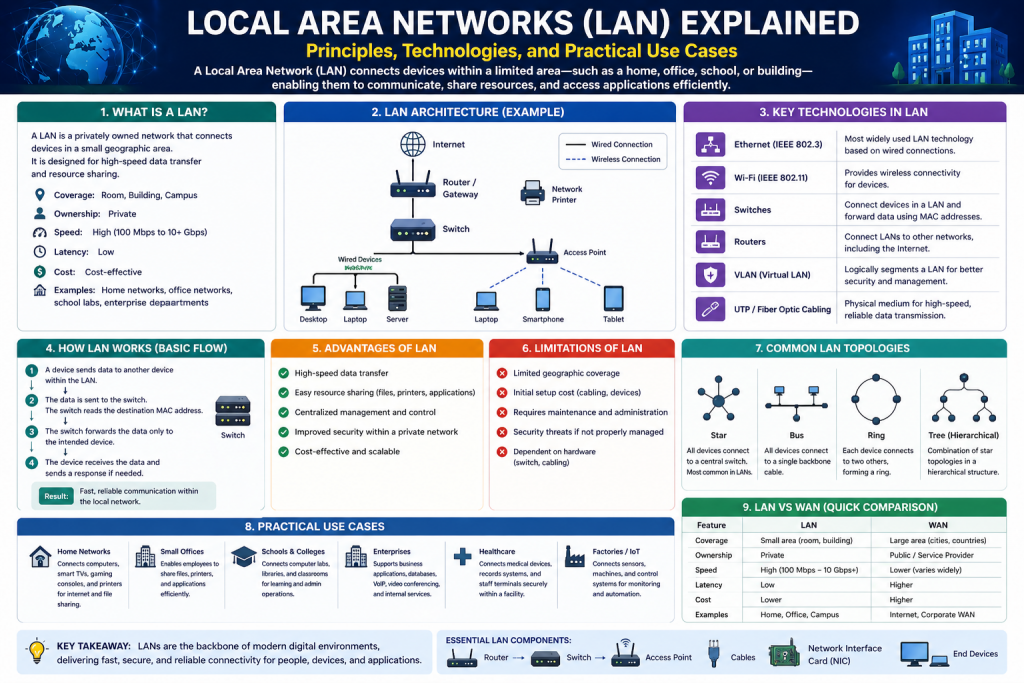
A Local Area Network, commonly referred to as a LAN, is a system that connects multiple computers and digital devices within a limited geographic area. This area can range from a single room or home to an entire office building or educational campus. The primary purpose of a LAN is to enable communication and resource sharing among connected devices, allowing them to work together efficiently as part of a unified system.
In today’s digital world, LANs are an essential component of nearly every technological environment. Whether it is a small business, a large corporation, or a home setup, LANs provide the infrastructure needed for devices to interact seamlessly. Without LANs, users would face significant challenges in sharing files, accessing printers, or connecting to the internet in an organized manner.
The concept of a LAN may appear simple on the surface, but it involves a combination of hardware, software, and communication protocols working together to ensure smooth operation. Understanding the fundamentals of LANs is crucial for anyone interested in networking, as it forms the basis for more advanced concepts such as wide area networks, cloud computing, and cybersecurity.
Definition and Scope of a LAN
A LAN can be defined as a network of interconnected devices that share resources within a confined area. These devices may include computers, printers, scanners, servers, and other network-enabled equipment. The defining characteristic of a LAN is its limited scope, which allows for high-speed communication and efficient data transfer.
Unlike larger networks that span cities or countries, LANs are typically owned and managed by a single organization or individual. This level of control enables administrators to customize the network according to specific needs, ensuring optimal performance and security.
The scope of a LAN can vary depending on its purpose. In a home environment, a LAN may consist of just a few devices connected to a wireless router. In contrast, a corporate LAN may include hundreds or even thousands of devices spread across multiple floors or buildings. Despite these differences, all LANs share the same fundamental goal of facilitating communication and resource sharing.
Importance of LANs in Modern Computing
LANs play a vital role in modern computing by providing the foundation for connectivity and collaboration. They enable users to share information, access resources, and communicate with each other in real time. This level of connectivity is essential for productivity in both personal and professional settings.
In business environments, LANs allow employees to collaborate on projects, share files, and access centralized databases. This not only improves efficiency but also reduces the need for redundant resources. For example, instead of each employee having their own printer, a single network printer can be shared among multiple users.
In educational institutions, LANs support learning by providing access to digital resources, online tools, and communication platforms. Students and teachers can interact with each other, share information, and access educational.
At home, LANs enable users to connect multiple devices such as laptops, smartphones, smart TVs, and gaming consoles. This allows for seamless access to the internet and the sharing of media and files across devices.
Basic Components of a LAN
A LAN is made up of several key components that work together to enable communication between devices. These components include nodes, network interface cards, transmission media, and networking devices such as routers and switches.
Nodes are the devices connected to the network. Each node is capable of sending and receiving data, making it an active participant in the network. Examples of nodes include computers, printers, and smartphones.
Network interface cards, or NICs, are hardware components that allow devices to connect to the network. They provide the necessary interface for communication and are essential for enabling data transmission.
Transmission media refers to the physical or wireless channels through which data is transmitted. This may include Ethernet cables, fiber optic cables, or wireless signals. The choice of transmission media can affect the speed, reliability, and cost of the network.
Networking devices such as routers and switches play a crucial role in managing data flow within the network. They ensure that data is delivered to the correct destination efficiently and without conflicts.
Evolution of Local Area Networks
The concept of LANs has evolved significantly over time. In the early days of computing, networks were limited in scope and functionality. Devices were often connected using simple wiring systems, and data transfer speeds were relatively slow.
As technology advanced, new networking standards and protocols were developed to improve performance and reliability. Ethernet became one of the most widely used technologies for LANs, providing a standardized method for connecting devices and transmitting data.
Wireless networking also emerged as a significant advancement, allowing devices to connect without the need for physical cables. This increased flexibility and convenience, making it easier to set up and expand networks.
Today, LANs continue to evolve with the introduction of new technologies such as high-speed fiber optics and advanced security measures. These advancements have made LANs more efficient, scalable, and secure than ever before.
Types of Local Area Networks
LANs can be categorized into different types based on their configuration and communication methods. The two most common types are wired LANs and wireless LANs.
Wired LANs use physical cables to connect devices. These networks are known for their reliability and high data transfer speeds. Ethernet is the most common technology used in wired LANs, providing a stable and efficient connection.
Wireless LANs, on the other hand, use radio signals to connect devices. These networks offer greater flexibility, as devices can connect without being physically tethered to the network. Wireless LANs are commonly used in homes, offices, and public.
Each type of LAN has its own advantages and disadvantages. Wired networks are generally faster and more secure, while wireless networks offer convenience and ease of use. The choice between the two depends on the specific needs and requirements of the user.
Role of Communication Protocols in LANs
Communication protocols are essential for the operation of a LAN. They define the rules and standards that govern how data is transmitted and received. Without these protocols, devices would not be able to communicate effectively.
One of the most important protocol suites used in LANs is TCP/IP. This system breaks data into smaller units called packets, which are then transmitted across the network. Each packet contains information about its destination, ensuring that it reaches the correct device.
Protocols also help manage errors, control data flow, and ensure data integrity. They play a crucial role in maintaining the reliability and efficiency of the network.
Data Transmission in a LAN
Data transmission in a LAN involves the transfer of information from one device to another. This process begins when a device sends data in the form of packets. These packets travel through the network, guided by networking devices such as switches and routers.
Each packet contains a header that includes information about its source and destination. This allows the network to determine the best path for the data to travel. Once the packets reach their destination, they are reassembled into their original form.
The speed and efficiency of data transmission depend on various factors, including the type of transmission media, network configuration, and the number of connected devices. Optimizing these factors is essential for ensuring smooth network performance.
Advantages of Using a LAN
LANs offer numerous advantages that make them indispensable in modern environments. One of the most significant benefits is resource sharing. By connecting devices to a network, users can share hardware such as printers and storage devices, reducing costs and improving efficiency.
Another advantage is improved communication. LANs enable users to exchange information quickly and easily, whether through email, file sharing, or real-time communication tools. This enhances collaboration and productivity.
LANs also provide centralized control, allowing administrators to manage the network from a single location. This makes it easier to monitor activity, enforce security policies, and perform maintenance tasks.
Additionally, LANs offer high-speed data transfer, making them ideal for applications that require fast and reliable communication. This is particularly important in environments where large amounts of data need to be processed and shared.
Challenges and Considerations in LAN Design
While LANs offer many benefits, they also present certain challenges that must be addressed during the design and implementation process. One of the main challenges is ensuring network security. As networks become more complex, they become more vulnerable to threats such as unauthorized access and malware attacks.
Another consideration is scalability. As the number of devices on the network increases, the network must be able to handle the additional load without compromising performance. This requires careful planning and the use of appropriate hardware and technologies.
Cost is also an important factor. Setting up and maintaining a LAN can require significant investment in equipment and infrastructure. Balancing cost with performance and reliability is a key aspect of network design.
Finally, network management can be complex, particularly in large environments. Administrators must monitor network activity, troubleshoot issues, and ensure that the network operates smoothly at all times.
How a Local Area Network Functions
A Local Area Network operates through a coordinated system of devices, protocols, and transmission methods that allow data to move efficiently between connected nodes. At its most basic level, a LAN enables devices to send and receive information in the form of digital signals. These signals are converted into structured data units and transmitted across the network using defined communication standards.
When a user performs an action such as sending a file, opening a webpage, or printing a document, the device generates data that must travel to another device or service. This data is divided into smaller units called packets. Each packet contains not only a portion of the data but also important information such as the source address and destination address. This ensures that the data can be routed correctly through the network.
The process of data transmission involves multiple stages, including data encapsulation, addressing, routing, and delivery. Each stage plays a crucial role in ensuring that information reaches its intended destination without errors. The coordination of these stages is what allows a LAN to function smoothly and efficiently.
Understanding Network Nodes and Devices
In a LAN, every connected device is referred to as a node. Nodes are the fundamental building blocks of the network, as they are responsible for generating, sending, receiving, and processing data. Without nodes, a network would have no purpose or functionality.
Nodes can take many forms, including desktop computers, laptops, servers, printers, smartphones, and even smart home devices. Each node is equipped with a network interface that allows it to connect to the network and communicate with other devices.
The role of a node depends on its function within the network. Some nodes act as clients, requesting data or services from other devices. Others act as servers, providing resources such as files, applications, or storage. This interaction between clients and servers is a key aspect of how LANs operate.
As the number of nodes increases, the complexity of the network also grows. Managing communication between multiple devices requires efficient coordination and the use of specialized networking equipment.
Role of Network Interface Cards in Communication
A Network Interface Card, commonly known as a NIC, is a critical component that enables a device to connect to a LAN. It serves as the physical and logical interface between the device and the network.
The NIC is responsible for converting data from the device into a format that can be transmitted over the network. It also receives incoming data and translates it into a form that the device can understand. This process involves encoding and decoding signals, as well as managing data transmission rates.
Each NIC is assigned a unique hardware address known as a Media Access Control address. This address is used to identify the device on the network and ensure that data is delivered to the correct destination.
NICs can support both wired and wireless connections. Wired NICs use Ethernet cables to connect to the network, while wireless NICs use radio signals. The choice of NIC depends on the type of network and the requirements of the user.
Data Communication Through TCP/IP Protocol
The Transmission Control Protocol and Internet Protocol form the foundation of data communication in a LAN. These protocols define how data is structured, transmitted, and received across the network.
When data is sent from one device to another, it is first broken down into packets by the Transmission Control Protocol. Each packet is assigned a sequence number and includes error-checking information to ensure data integrity.
The Internet Protocol is responsible for addressing and routing these packets. It assigns a unique IP address to each device on the network, allowing packets to be directed to the correct destination.
As packets travel through the network, they may take different paths depending on network conditions. Once all packets reach their destination, they are reassembled in the correct order to reconstruct the original data.
This combination of reliability and flexibility makes TCP/IP an essential component of modern networking.
Function of Switches in a LAN Environment
Switches play a vital role in connecting devices within a LAN. They operate at a level where they can identify devices based on their hardware addresses and direct data accordingly.
When a switch receives a data packet, it examines the destination address and determines which port the packet should be sent to. This allows the switch to deliver data directly to the intended device, rather than broadcasting it to all devices on the network.
This targeted approach improves network efficiency and reduces unnecessary traffic. It also enhances security by limiting the exposure of data to only the relevant devices.
Switches are often used in environments where multiple devices need to be connected, such as offices and data centers. They provide a scalable solution for expanding the network while maintaining performance.
Role of Routers in Network Communication
Routers are responsible for connecting different networks and directing data between them. In a LAN, a router typically serves as the gateway to external networks, including the internet.
The router examines the destination IP address of each packet and determines the best path for it to travel. This process is known as routing and is essential for ensuring efficient data delivery.
Routers also perform additional functions such as network address translation, which allows multiple devices on a LAN to share a single public IP address. This is particularly important for connecting to the internet.
In addition to routing, routers often include security features such as firewalls. These features help protect the network from unauthorized access and potential threats.
Importance of IP Addressing in LANs
IP addressing is a fundamental aspect of network communication. Each device on a LAN is assigned a unique IP address, which serves as its identifier on the network.
IP addresses allow devices to locate and communicate with each other. Without them, it would be impossible to determine where data should be sent.
There are different types of IP addresses, including private and public addresses. Private addresses are used within a LAN, while public addresses are used for communication with external networks.
The assignment of IP addresses can be done manually or automatically through a system known as dynamic host configuration. Automatic assignment simplifies network management and reduces the risk of errors.
Data Flow and Packet Switching Mechanism
The flow of data within a LAN is managed through a process known as packet switching. This method involves breaking data into packets and transmitting them independently across the network.
Packet switching allows for efficient use of network resources, as packets can take different routes to reach their destination. This flexibility helps prevent congestion and improves overall performance.
As packets travel through the network, they pass through various devices such as switches and routers. Each device examines the packet and forwards it based on its destination address.
Once all packets arrive at their destination, they are reassembled into the original data. This process ensures that information is delivered accurately and efficiently.
Wired and Wireless Communication in LANs
LANs can support both wired and wireless communication methods. Each method has its own advantages and is suited to different scenarios.
Wired communication uses physical cables to connect devices. This method is known for its reliability and high data transfer speeds. It is commonly used in environments where stable connections are essential.
Wireless communication uses radio signals to connect devices without the need for cables. This provides greater flexibility and mobility, allowing users to connect from different locations within the network area.
Many modern LANs use a combination of both wired and wireless connections to achieve a balance between performance and convenience.
Network Topologies Used in LANs
Network topology refers to the physical or logical arrangement of devices within a network. Different topologies are used in LANs depending on the requirements and design considerations.
Common topologies include star, bus, and ring configurations. In a star topology, all devices are connected to a central hub or switch. This is the most widely used topology due to its simplicity and reliability.
Bus topology involves a single communication line that connects all devices. While it is simple to implement, it is less reliable and not commonly used in modern networks.
Ring topology connects devices in a circular manner, where each device is connected to two others. Data travels in one direction around the ring.
The choice of topology affects the performance, scalability, and reliability of the network.
Network Security Within a LAN
Security is a critical aspect of LAN operation. Protecting the network from unauthorized access and threats is essential for maintaining data integrity and privacy.
Various security measures can be implemented within a LAN, including firewalls, access control systems, and encryption. These measures help prevent unauthorized users from accessing sensitive information.
User authentication is another important aspect of network security. By requiring users to verify their identity, administrators can control access to network resources.
Regular monitoring and updates are also necessary to ensure that the network remains secure against emerging threats.
Performance Factors Affecting LAN Efficiency
The performance of a LAN is influenced by several factors, including network design, hardware quality, and the number of connected devices.
Bandwidth plays a significant role in determining how much data can be transmitted at a given time. Higher bandwidth allows for faster data transfer and improved performance.
Latency, or the delay in data transmission, can also affect network performance. Minimizing latency is important for applications that require real-time communication.
Network congestion occurs when too many devices attempt to use the network simultaneously. This can lead to slower performance and increased delays.
Proper network design and management can help mitigate these issues and ensure optimal performance.
Scalability and Expansion of LANs
As organizations grow, their networking needs also increase. A well-designed LAN should be scalable, allowing for the addition of new devices without compromising performance.
Scalability can be achieved through the use of modular hardware and flexible network designs. Switches and routers with additional ports can accommodate new devices as needed.
Planning for future expansion is an important aspect of network design. By anticipating growth, organizations can avoid costly upgrades and disruptions.
Centralized and Distributed Network Management
LANs can be managed using either centralized or distributed approaches. In a centralized system, network management is handled from a single location, allowing for greater control and efficiency.
Distributed management involves multiple control points, providing redundancy and flexibility. Each approach has its own advantages and is chosen based on the specific needs of the network.
Centralized management is often preferred in larger organizations, as it simplifies administration and monitoring. Distributed management may be used in environments where reliability and fault tolerance are critical.
Benefits of Using a Local Area Network
A Local Area Network provides a wide range of benefits that make it an essential component of modern computing environments. One of the most significant advantages is the ability to share resources efficiently. In a networked environment, multiple users can access shared devices such as printers, scanners, and storage systems. This eliminates the need for each individual to have their own dedicated hardware, resulting in reduced costs and improved utilization of resources.
Another major benefit of a LAN is enhanced communication. Users connected to the same network can easily exchange information through file sharing, messaging systems, and collaborative tools. This level of connectivity is particularly valuable in organizational settings, where teamwork and information exchange are critical for productivity.
LANs also contribute to improved data management. By centralizing data storage, organizations can ensure that information is consistent, up-to-date, and easily accessible. Centralized storage systems allow users to retrieve files from a single location, reducing duplication and minimizing the risk of data loss.
Security is another important advantage of LANs. With proper configuration, administrators can implement security measures such as firewalls, access controls, and monitoring systems to protect the network from unauthorized access. This helps safeguard sensitive information and ensures that only authorized users can access critical resources.
In addition to these benefits, LANs provide high-speed data transfer. Because the network is confined to a limited area, data can be transmitted quickly and efficiently. This is especially important for applications that require real-time communication, such as video conferencing and online collaboration.
Resource Sharing and Cost Efficiency
Resource sharing is one of the primary reasons organizations implement LANs. By connecting devices to a network, resources can be shared among multiple users, reducing the need for redundant equipment. For example, instead of purchasing multiple printers, a single network printer can serve an entire office.
This approach not only reduces hardware costs but also simplifies maintenance. Managing a single device is much easier than maintaining multiple units. Additionally, centralized resources can be upgraded or replaced without affecting individual users, ensuring minimal disruption.
Storage is another area where resource sharing proves beneficial. Network-attached storage systems allow users to store and access files from a central location. This makes it easier to manage data and ensures that important information is backed up and protected.
Software resources can also be shared within a LAN. Applications can be installed on a central server and accessed by multiple users, reducing licensing costs and simplifying updates. This approach ensures that all users have access to the same version of the software, improving compatibility and efficiency.
Centralized Management and Control
One of the key advantages of a LAN is the ability to manage the network from a central location. Network administrators can monitor activity, configure settings, and enforce policies without needing to access each individual device.
Centralized management simplifies tasks such as user account creation, permission assignment, and software updates. Administrators can control who has access to specific resources, ensuring that sensitive information is protected.
Monitoring tools allow administrators to track network performance and identify potential issues before they become serious problems. This proactive approach helps maintain the reliability and efficiency of the network.
Centralized control also enhances security. By managing access to the network, administrators can prevent unauthorized users from gaining entry. This is particularly important in environments where sensitive data is stored and transmitted.
Internet Access and Connectivity
A LAN provides a convenient way to share internet access among multiple devices. By connecting the network to a router, all devices within the LAN can access online resources. This eliminates the need for separate internet connections for each device.
Shared internet access also allows for better bandwidth management. Administrators can prioritize certain types of traffic, ensuring that critical applications receive the necessary resources. This helps maintain consistent performance and prevents network congestion.
In addition to internet access, LANs enable connectivity between different devices and systems. This allows users to interact with various applications and services, enhancing productivity and collaboration.
Client Server Architecture in LANs
Client-server architecture is a common model used in LANs. In this setup, certain devices act as servers, providing resources and services to other devices known as clients. This structure allows for efficient management and distribution of resources.
Servers can host applications, store data, and manage network operations. Clients access these resources as needed, creating a dynamic and flexible environment. This approach simplifies administration and ensures that resources are used efficiently.
One of the main advantages of client-server architecture is scalability. As the network grows, additional clients can be added without significant changes to the overall structure. Servers can also be upgraded to handle increased demand.
This architecture also improves security and reliability. By centralizing resources, administrators can implement consistent security measures and ensure that data is protected.
Steps to Set Up a Local Area Network
Setting up a LAN involves several steps, beginning with planning and preparation. The first step is to determine the requirements of the network, including the number of devices, the type of applications, and the desired level of performance.
Once the requirements are established, the next step is to select the appropriate hardware. This includes routers, switches, cables, and network-enabled devices. Choosing high-quality equipment is essential for ensuring reliable performance.
The physical setup involves connecting devices using cables or wireless connections. Each device must be properly connected to the network, ensuring that communication can take place.
After the physical connections are established, the network must be configured. This includes assigning addresses to devices, setting up security features, and configuring internet access. Proper configuration is critical for ensuring that the network operates smoothly.
Finally, the network should be tested to verify that all devices can communicate with each other. This includes checking connectivity, accessing shared resources, and ensuring that internet access is functioning correctly.
Hardware Requirements for LAN Implementation
Implementing a LAN requires several key hardware components. Routers are essential for managing traffic and connecting the network to external systems. Switches are used to connect multiple devices and facilitate communication within the network.
Cables are used in wired networks to establish connections between devices. Different types of cables are available, each offering varying levels of performance and reliability.
Devices such as computers, printers, and servers are the endpoints of the network. Each device must be equipped with a network interface to enable communication.
In some cases, additional hardware such as modems and access points may be required. These components enhance connectivity and provide additional functionality.
Configuring Network Settings
Network configuration involves setting up the parameters that govern how the network operates. This includes assigning addresses to devices, enabling communication protocols, and configuring security settings.
Dynamic address assignment simplifies the process by automatically assigning addresses to devices. This reduces the risk of conflicts and ensures that each device has a unique identifier.
Wireless settings must also be configured if the network includes wireless connectivity. This involves setting up network names and access credentials.
Proper configuration ensures that the network operates efficiently and securely. It also provides a foundation for troubleshooting and maintenance.
Testing and Verifying Network Connectivity
Once the network is set up, it is important to test and verify connectivity. This involves checking that all devices can communicate with each other and access shared resources.
Testing may include sending data between devices, accessing shared files, and connecting to the internet. Any issues identified during testing should be addressed before the network is fully deployed.
Verification ensures that the network meets the requirements and performs as expected. It also helps identify potential problems that may need to be resolved.
Common Issues in Local Area Networks
Despite careful planning and implementation, LANs may encounter various issues. Common problems include connectivity issues, slow performance, and hardware failures.
Connectivity issues may arise due to incorrect configuration, faulty cables, or device malfunctions. Identifying the root cause is essential for resolving these issues.
Performance problems may occur when the network is overloaded or improperly configured. This can result in slow data transfer and reduced efficiency.
Hardware failures can disrupt network operation and require immediate attention. Regular maintenance and monitoring can help prevent such issues.
Troubleshooting Techniques for LANs
Troubleshooting a LAN involves a systematic approach to identifying and resolving issues. The first step is to check physical connections, ensuring that all devices are properly connected.
Loose cables, damaged connectors, or unplugged devices are among the most common causes of network problems, and verifying these basics can often resolve issues quickly without further investigation.
After confirming physical connectivity, the next step is to test network communication between devices. This can be done using basic tools to check whether devices can reach each other across the network. If communication fails, it may indicate problems with network configuration, such as incorrect addressing or disabled network interfaces.
Another important step is to review device settings and configurations. Misconfigured routers, switches, or individual devices can disrupt communication and cause performance issues. Ensuring that settings such as IP addresses, subnet configurations, and access permissions are correct is essential for proper operation.
Restarting network devices is also a simple but effective troubleshooting method. Rebooting routers, switches, and computers can clear temporary errors and restore normal functionality. Additionally, checking for software updates and installing the latest patches can resolve compatibility issues and improve performance. By following a structured process, network problems can be identified efficiently and resolved with minimal disruption.
Restarting devices can often resolve temporary issues. This simple step can restore connectivity and improve performance.
Configuration settings should also be reviewed to ensure that they are correct. Incorrect settings can lead to communication problems and reduced functionality.
Security settings should be examined to ensure that they are not blocking legitimate traffic. Adjusting these settings can help restore normal operation.
Updating software and drivers is another important step in troubleshooting. Outdated components can cause compatibility issues and affect performance.
Maintenance and Monitoring of LANs
Maintaining a LAN requires ongoing effort to ensure that it remains reliable and secure. Regular monitoring helps identify potential issues before they become serious problems.
. In addition to monitoring, routine maintenance tasks play a crucial role in keeping the network running smoothly. These tasks include updating firmware, applying security patches, and ensuring that all devices are operating with the latest drivers and configurations. Keeping systems up to date helps protect against vulnerabilities and improves overall network performance.
Another important aspect of LAN maintenance is performance optimization. Network administrators often analyze traffic patterns to detect congestion or bottlenecks that may slow down communication. By adjusting configurations, upgrading hardware, or redistributing network loads, they can enhance efficiency and ensure consistent performance.
Backup and recovery planning is also essential. Regular data backups ensure that critical information can be restored in case of hardware failure, cyberattacks, or accidental data loss. Testing these backups periodically is equally important to confirm their reliability.
Physical inspection of network equipment should not be overlooked. Checking cables, ports, and devices helps prevent unexpected failures caused by wear and tear. By combining proactive monitoring, regular updates, and preventive maintenance, organizations can ensure that their LAN remains stable, secure, and capable of supporting daily operations without interruption.
Maintenance tasks may include updating software, replacing faulty hardware, and optimizing network performance. These activities help ensure that the network continues to operate efficiently.
Monitoring tools provide valuable insights into network activity and performance. By analyzing this data, administrators can make informed decisions and improve network operation.
Future Trends in Local Area Networking
As technology continues to evolve, LANs are also undergoing significant changes. Advances in networking technology are leading to faster speeds, improved security, and greater flexibility.
Modern LANs are now being designed with scalability in mind, allowing organizations to expand their networks without major disruptions. This is especially important in dynamic environments where the number of connected devices is constantly increasing due to the growth of smart devices and the Internet of Things.
Another important development is the adoption of high-speed communication standards, which enable faster data transfer and reduce latency. This is particularly beneficial for applications such as video streaming, cloud computing, and real-time collaboration tools. At the same time, enhanced security measures are being integrated into network design, including advanced encryption methods, intrusion detection systems, and continuous monitoring to protect against evolving cyber threats.
Wireless technologies are also improving rapidly, providing more stable and reliable connections than ever before. This allows users to move freely within a network without sacrificing performance. Additionally, automation is becoming a key feature in modern LANs, helping administrators manage networks more efficiently by reducing manual tasks and minimizing human error. These innovations are transforming LANs into more intelligent, adaptable, and future-ready systems that can meet the demands of an increasingly connected world.
Wireless technology is becoming increasingly important, allowing for more flexible and scalable networks. New standards are being developed to support higher data rates and improved performance.
Automation and artificial intelligence are also playing a role in network management. These technologies can help optimize performance, detect issues, and improve security.
The integration of cloud services is another important trend. LANs are increasingly being connected to cloud platforms, enabling new capabilities and enhancing functionality.
Conclusion
A Local Area Network is a fundamental component of modern computing, providing the infrastructure needed for communication, resource sharing, and collaboration. From small home networks to large organizational systems, LANs play a critical role in enabling efficient and secure data exchange.
The benefits of LANs, including resource sharing, centralized management, and high-speed connectivity, make them indispensable in today’s digital environment. By understanding how to set up, manage, and troubleshoot a LAN, individuals and organizations can maximize the value of their network infrastructure.
As technology continues to advance, LANs will remain a key element of digital connectivity, supporting innovation and enabling new possibilities in communication and information sharing.
Continue exploring the technologies and certification concepts that matter most to you.