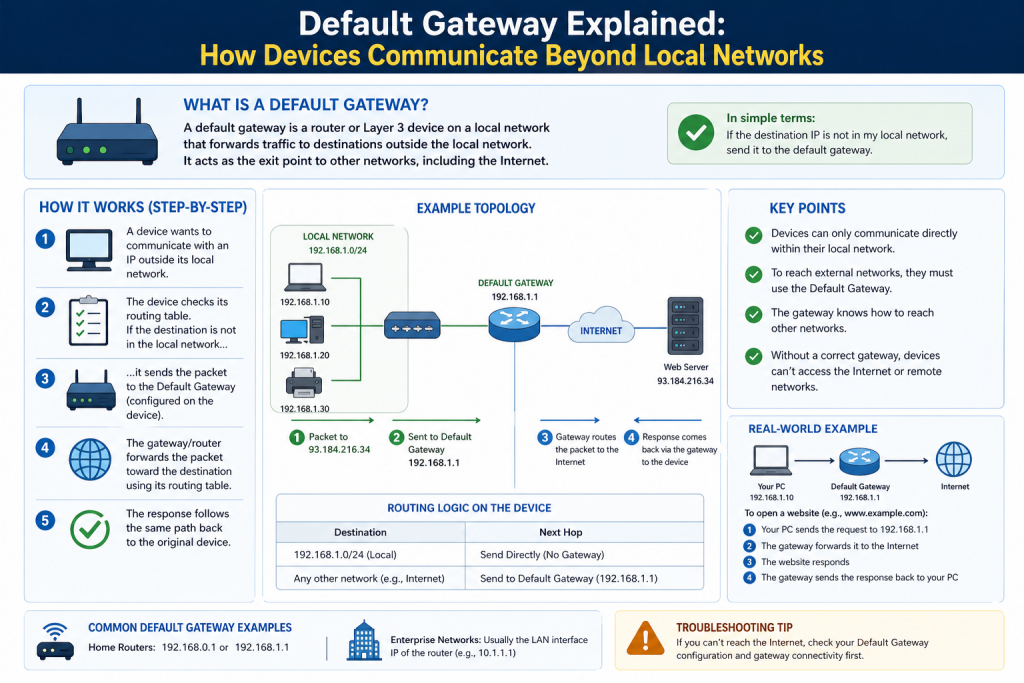
A default gateway is one of the most important components in a computer network. It acts as the main connection point that allows devices within a local network to communicate with systems outside of that network. In most cases, the default gateway is a router, but it can also be another type of network device depending on how the network is designed. Its primary role is to forward data packets from a local environment to external networks and bring responses back to the originating devices.
When you connect your phone, laptop, or any smart device to a network, it becomes part of a local area network. Within that network, devices can communicate directly with each other using their assigned IP addresses. However, communication becomes more complex when a device needs to access resources outside the local network, such as websites, cloud services, or remote servers. The default gateway is what makes this external communication possible.
Without a default gateway, devices would be limited to interacting only within their own network. This means no internet access, no ability to connect to remote systems, and no communication beyond the local environment. Because of this, the default gateway is considered a critical part of network infrastructure, whether in a home, office, or enterprise environment.
How Networks Communicate
To understand the role of a default gateway, it helps to first understand how communication works within a network. Every device connected to a network is assigned an IP address. This address acts like a unique identifier, allowing devices to locate and communicate with each other. When one device wants to send data to another device on the same network, it uses this IP address to deliver the information directly.
This type of communication is straightforward because all devices share the same network segment. The data does not need to travel far or pass through multiple systems. However, when the destination is outside the local network, things become more complicated. The sending device cannot directly reach the destination because it does not exist within the same network boundaries.
This is where routing comes into play. Routing is the process of determining the path that data should take to reach its destination. Devices maintain a routing table, which contains information about known network paths. If the destination address matches a known route, the device sends the data accordingly. If no specific route is found, the device relies on the default gateway to handle the traffic.
The default gateway serves as the fallback option for all outgoing traffic that does not have a defined path. It receives the data and decides how to forward it toward its destination, often passing it through multiple networks along the way.
The Role of the Default Gateway
The default gateway functions as a bridge between different networks. It connects the local network to external networks and ensures that data can move between them. When a device sends a request to access a website, for example, that request is first sent to the default gateway. The gateway then forwards the request to the appropriate external network, eventually reaching the destination server.
Once the server responds, the data travels back through the network to the gateway, which then delivers it to the original device. This process happens continuously and almost instantly, allowing users to browse the internet, stream videos, and use online applications without noticing the complex routing happening behind the scenes.
The gateway is responsible for both outgoing and incoming traffic. For outgoing traffic, it determines the next step in the journey. For incoming traffic, it ensures that the data is delivered to the correct device within the local network. This dual role makes it a central component in maintaining communication flow.
In many cases, the default gateway also provides additional functions, such as network security, firewall protection, and traffic management. These features help protect the network from unauthorized access and ensure efficient data transmission.
Default Gateway in Everyday Use
In a typical home or small office network, the default gateway is usually the wireless router. This device connects to the internet through a service provider and creates a local network for connected devices. When you connect your smartphone or computer to Wi-Fi, the router automatically becomes your default gateway.
The router assigns IP addresses to devices and provides them with the gateway address through automatic configuration. This process is seamless and requires no manual setup for most users. As a result, people can connect to the internet quickly without needing to understand the technical details behind the scenes.
For example, when you open a web browser and enter a website address, your device sends a request to the default gateway. The gateway forwards that request to the internet, retrieves the response, and sends it back to your device. This entire process takes place in a matter of milliseconds.
In larger networks, such as those found in businesses or organizations, the setup is more complex. There may be multiple gateways handling different types of traffic, such as internal communication between departments or external communication with the internet. These gateways can be physical devices or virtual systems running on servers.
Routing and Data Flow
The concept of routing is closely tied to the function of the default gateway. Routing determines how data travels from one network to another. The default gateway plays a key role in this process by acting as the starting point for outgoing traffic that does not have a predefined route.
When a device sends data, it checks its routing table to see if it knows how to reach the destination. If it does not, the data is sent to the default gateway. The gateway then examines the destination address and decides where to send the data next. This may involve forwarding the data to another router, which continues the process until the data reaches its final destination.
This step-by-step forwarding is known as packet switching. Data is broken into smaller units called packets, each containing information about its destination. These packets may take different paths through the network, but they are reassembled at the destination to form the original data.
The default gateway ensures that packets leaving the local network are directed toward the correct path. It also handles incoming packets, making sure they are delivered to the right device. Without this process, communication between networks would not be possible.
Importance of the Default Gateway
The default gateway is essential for enabling communication beyond the local network. It allows devices to access external resources, including websites, online services, and remote systems. Without it, a network would be isolated and unable to interact with the outside world.
In addition to enabling connectivity, the default gateway also plays a role in network organization and management. It helps control how data flows between networks and can be used to enforce security policies. For example, a gateway may block certain types of traffic or restrict access to specific websites.
Beyond these basic functions, the default gateway also contributes to maintaining order and efficiency within a network. By acting as a central control point, it allows administrators to define rules that determine how traffic should be handled. This includes prioritizing certain types of data, such as voice or video traffic, to ensure smooth performance for critical applications. In busy networks, this type of traffic management is essential to prevent congestion and maintain a consistent user experience.
The gateway can also be used to segment network traffic, separating different types of users or devices into distinct groups. For instance, in an office environment, employee devices, guest devices, and internal servers can be managed separately even though they share the same physical network. This segmentation improves both performance and security by limiting unnecessary interactions between different parts of the network.
Another important aspect is monitoring and logging. The default gateway can track the flow of data entering and leaving the network, providing valuable insights into usage patterns and potential issues. Administrators can use this information to identify unusual activity, detect security threats, or optimize network performance. Logs generated by the gateway are often a key resource when investigating network problems or security incidents.
The reliability of the default gateway is also important. If the gateway becomes unavailable, devices may lose access to external networks even though they can still communicate locally. This is why many networks include backup gateways or redundancy measures to ensure continuous connectivity.
Default Gateway and IP Addressing
Every device on a network has its own IP address, which identifies it within that network. The default gateway also has an IP address, which is used by devices as the destination for outgoing traffic. This address is typically within the same range as the devices on the network.
For example, in a network using addresses like 192.168.1.x, the default gateway might have an address such as 192.168.1.1. Devices use this address to send data when they need to reach external networks.
It is important to understand the difference between a device’s IP address and the gateway’s IP address. The device’s IP address identifies it locally, while the gateway’s IP address represents the path out of the network. Both are necessary for proper communication.
When configuring a device, the gateway address must be set correctly. If it is incorrect or missing, the device may not be able to access external networks even if it is connected to the local network.
Automatic and Manual Configuration
In most networks, the default gateway is assigned automatically using a system called Dynamic Host Configuration Protocol. This system allows devices to receive their network settings without manual input. When a device connects to the network, it is provided with an IP address, subnet mask, and default gateway address.
This automatic configuration simplifies the process of connecting devices and ensures that settings are consistent across the network. It is commonly used in home networks, offices, and public Wi-Fi environments.
In some cases, manual configuration may be required. This involves entering the gateway address and other network settings directly into the device. Manual configuration is often used in specialized environments where precise control over network settings is needed.
How the Default Gateway Forwards Traffic
The primary responsibility of a default gateway is to forward traffic from one network to another. When a device on a local network sends data to a destination outside its own network, it does not send that data directly to the destination. Instead, it sends the data to the default gateway, which then takes responsibility for forwarding it toward its final location.
Every device uses a routing table to determine where to send data. This table contains known routes for specific networks. If a device finds a matching route for a destination, it sends the data accordingly. However, when no specific route exists, the device relies on the default gateway as the next step. This is why it is called the “default” gateway, because it acts as the standard path when no other route is available.
Once the gateway receives the data, it examines the destination IP address and determines the best possible path. It may forward the data to another router, which continues the process until the data reaches its target. This multi-step journey ensures that data can travel across vast and complex networks efficiently.
Communication Between Local and External Networks
Local networks are designed to allow devices to communicate easily within a limited environment. However, modern networking requires constant interaction with external systems, such as cloud platforms, websites, and remote servers. The default gateway makes this communication possible by linking the local network to external networks.
When a user accesses a website, the request is first sent to the gateway. The gateway then forwards that request through the internet infrastructure until it reaches the server hosting the website. The server processes the request and sends back a response, which travels through the same network path in reverse. The gateway receives this response and delivers it to the original device.
This process happens continuously for all types of online activities, including streaming, gaming, file sharing, and messaging. The gateway ensures that data flows smoothly between networks, maintaining communication without interruption.
Packet Handling and Data Transmission
Data transmitted across networks is divided into smaller units called packets. Each packet contains a portion of the data along with information about its source and destination. This method of transmission allows networks to handle large amounts of data efficiently.
When packets are sent from a device, they are directed to the default gateway if the destination is outside the local network. The gateway processes each packet individually, determining the best route for it to follow. Packets may take different paths to reach the same destination, depending on network conditions and routing decisions.
Once all packets arrive at the destination, they are reassembled into the original data. This process is managed automatically by network protocols, ensuring that users receive complete and accurate information.
The default gateway plays a crucial role in this system by ensuring that packets leave the local network and are directed toward the correct external paths. It also handles incoming packets, ensuring they are delivered to the correct device within the network.
Differences Between Client IP and Gateway IP
Understanding the distinction between a client IP address and a gateway IP address is essential for grasping how networks function. A client IP address is assigned to a device and identifies it within the local network. This address allows other devices on the same network to locate and communicate with it.
The gateway IP address, on the other hand, represents the device that connects the local network to external networks. When a device needs to send data outside the local network, it uses the gateway IP address as the destination for that data.
For example, if a computer wants to access a website, it sends the request to the gateway’s IP address rather than directly to the website’s server. The gateway then forwards the request to the appropriate destination.
This separation of roles ensures that devices can communicate efficiently within their own network while still having access to external resources. It also simplifies network management by centralizing external communication through a single point.
Default Gateway in Small and Large Networks
In small networks, such as those found in homes or small offices, the default gateway is typically a single device. This device is usually a router that connects to the internet and manages all network traffic. It assigns IP addresses, provides internet access, and acts as the gateway for all connected devices.
In larger networks, the situation becomes more complex. Organizations often have multiple networks connected together, each with its own gateway. These gateways may handle different types of traffic, such as internal communication between departments or external communication with the internet.
Large networks may also use advanced routing techniques and multiple layers of gateways to ensure efficient data flow. Some gateways are dedicated to handling specific tasks, such as security filtering or load balancing. Others may exist as virtual systems within data centers, providing flexibility and scalability.
Despite these differences, the fundamental role of the default gateway remains the same. It serves as the point through which data leaves the local network and enters other networks.
How Devices Discover the Default Gateway
Devices need to know the address of the default gateway in order to communicate with external networks. This information is typically provided automatically through a process called dynamic configuration.
When a device connects to a network, it sends a request for network settings. A configuration server responds by providing the device with an IP address, subnet mask, and default gateway address. This process happens quickly and requires no manual input from the user.
Automatic configuration simplifies network setup and ensures consistency across devices. It is widely used in home networks, offices, and public environments where ease of use is important.
In some cases, devices may be configured manually. This involves entering the gateway address and other network settings directly into the device. Manual configuration is often used in controlled environments where specific settings are required.
Role of the Default Gateway in Troubleshooting
The default gateway is often the first point to check when troubleshooting network issues. If a device cannot access external networks but can still communicate locally, the gateway may be the source of the problem.
One common troubleshooting step is to test connectivity to the gateway. This can be done by sending a simple request to the gateway’s IP address and checking for a response. If the gateway responds, it indicates that the device can reach the edge of the network.
If there is no response, the issue may be related to network configuration, physical connections, or the gateway device itself. Checking cables, verifying settings, and restarting the gateway are common steps in resolving such issues.
Understanding the role of the gateway helps in identifying where communication is breaking down. It provides a clear starting point for diagnosing and fixing connectivity problems.
Common Connectivity Issues
Several issues can arise related to the default gateway. One common problem is the inability to access the internet while still being connected to the local network. This often indicates that the device cannot reach the gateway or that the gateway is not functioning properly.
Another issue is incorrect configuration. If the gateway address is set incorrectly, the device may not know where to send outgoing traffic. This can prevent access to external networks even though the device appears to be connected.
Physical issues can also affect the gateway. Loose cables, faulty hardware, or power interruptions can disrupt connectivity. In wireless networks, signal interference or distance from the router may also impact communication.
In larger networks, configuration errors or routing problems can cause traffic to be misdirected. These issues may require more advanced troubleshooting techniques to resolve.
Ensuring Reliable Gateway Performance
The performance of the default gateway has a direct impact on network efficiency. A slow or overloaded gateway can cause delays in data transmission, affecting activities such as browsing, streaming, and file transfers.
To ensure reliable performance, it is important to choose a gateway device that can handle the network’s workload. This includes considering factors such as the number of connected devices, the type of traffic, and the required speed.
Regular maintenance is also important. Keeping the gateway updated, monitoring its performance, and addressing issues promptly can help maintain a stable network environment.
In critical environments, redundancy may be used to provide backup gateways. This ensures that if one gateway fails, another can take over, minimizing disruption.
Security Considerations
The default gateway is a key point of entry and exit for network traffic, making it an important focus for security. It can be used to enforce security policies and protect the network from threats.
Many gateways include built-in security features, such as firewalls, which monitor and control incoming and outgoing traffic. These features help prevent unauthorized access and protect sensitive data.
Additional security measures may include filtering traffic, blocking malicious content, and encrypting communications. Proper configuration of these features is essential for maintaining a secure network.
Because the gateway is exposed to external networks, it must be protected against attacks. Regular updates, strong passwords, and careful monitoring can help reduce the risk of security breaches.
Managing and Optimizing Gateway Usage
Effective management of the default gateway involves monitoring traffic, optimizing performance, and ensuring proper configuration. Network administrators often use tools to analyze traffic patterns and identify potential issues.
Optimizing gateway usage may involve adjusting settings, upgrading hardware, or implementing advanced routing techniques. These steps can improve efficiency and ensure that the network operates smoothly.
In larger networks, multiple gateways may be used to distribute traffic and reduce congestion. This approach helps balance the load and improves overall performance.
Proper management also includes planning for future growth. As networks expand, the demands on the gateway increase. Ensuring that the gateway can handle these demands is essential for maintaining performance and reliability.
Methods of Configuring a Default Gateway
Configuring a default gateway is an essential step in setting up any networked device. Without a properly defined gateway, a device may connect to a local network but fail to access external systems such as the internet or remote servers. There are two primary approaches to configuring a default gateway: automatic configuration and manual configuration.
Automatic configuration is the most commonly used method, especially in home networks and small office environments. In this approach, a service assigns network settings to devices as soon as they connect. This includes the device’s IP address, subnet mask, and the default gateway address. This process is quick, efficient, and eliminates the need for user intervention. It ensures that devices receive consistent and correct network settings, reducing the likelihood of configuration errors.
Manual configuration, on the other hand, involves entering network settings directly into a device. This method is often used in controlled environments where precise configuration is required. For example, servers, network printers, or specialized equipment may require fixed network settings to ensure consistent communication. While manual configuration provides greater control, it also increases the risk of errors if incorrect values are entered.
Both methods have their advantages. Automatic configuration is simple and user-friendly, while manual configuration offers flexibility and precision. The choice between the two depends on the size and complexity of the network, as well as the level of control required.
Steps to Change the Default Gateway
There are situations where changing the default gateway becomes necessary. This may occur when upgrading network equipment, redesigning a network, or troubleshooting connectivity issues. Changing the gateway involves updating the network settings on a device to point to a new gateway address.
The process begins by identifying the IP address of the new gateway. This address must be within the same network range as the device. Once the correct address is known, the user can access the network settings of the device and replace the existing gateway address with the new one.
After saving the changes, the device will begin using the new gateway for all outgoing traffic. It is important to verify that the new gateway is functioning correctly and can handle network traffic. Testing connectivity by accessing external resources or sending test requests can help confirm that the configuration is successful.
Changing the default gateway should be done carefully, as incorrect settings can disrupt network connectivity. In larger environments, such changes are often planned and tested to avoid interruptions.
Finding the Default Gateway on Different Systems
Identifying the default gateway on a device is a common task, especially when troubleshooting network issues. Most operating systems provide simple ways to view network configuration details, including the gateway address.
On many systems, users can access network information through built-in tools or settings menus. These tools display details such as the device’s IP address, subnet mask, and default gateway. This information is useful for verifying that the device is correctly configured and connected to the network.
In command-line environments, specific commands can be used to display routing information. These commands provide a detailed view of how traffic is directed, including the default route. Understanding how to access and interpret this information is an important skill for managing networks.
Being able to quickly find the default gateway helps users diagnose connectivity problems and confirm that their devices are properly configured.
Troubleshooting Default Gateway Issues
When network problems occur, the default gateway is often one of the first components to examine. Many connectivity issues can be traced back to problems with the gateway or its configuration.
A common issue is the inability to access external networks while still being able to communicate within the local network. This typically indicates that the device cannot reach the gateway or that the gateway is not functioning properly. Checking the gateway address and ensuring it matches the network configuration is an important first step.
Another troubleshooting technique involves testing connectivity to the gateway. If the device can successfully communicate with the gateway, it suggests that the local connection is working correctly. If not, the issue may be related to physical connections, network settings, or the gateway device itself.
Restarting the gateway device is often an effective solution for resolving temporary issues. This can clear errors, refresh connections, and restore normal operation. Additionally, checking cables, wireless connections, and device settings can help identify and resolve problems.
In more complex networks, troubleshooting may involve analyzing routing tables, reviewing logs, and using diagnostic tools to trace the path of data. These methods provide deeper insight into how traffic is being handled and where issues may be occurring.
Common Mistakes in Gateway Configuration
Incorrect configuration of the default gateway can lead to a variety of network problems. One common mistake is entering an incorrect gateway address. If the address does not match the network range, the device will not be able to send traffic outside the local network.
Another mistake is failing to configure a gateway at all. Without a gateway, the device will have no route to external networks, resulting in limited connectivity. This can occur when network settings are manually configured and the gateway field is left blank.
Conflicts between devices can also cause issues. For example, if multiple devices are assigned the same IP address, it can disrupt communication and affect the gateway’s ability to route traffic correctly.
Inconsistent settings across devices can create additional problems. Ensuring that all devices use compatible network configurations helps maintain smooth communication and prevents connectivity issues.
Importance of Redundancy in Gateways
In critical environments, relying on a single default gateway can create a point of failure. If the gateway becomes unavailable, devices may lose access to external networks, which can disrupt operations. To address this risk, many networks implement redundancy.
Redundancy involves using multiple gateways to provide backup in case one fails. If the primary gateway goes offline, a secondary gateway can take over, ensuring continuous connectivity. This process is often seamless, with minimal impact on users.
Implementing redundancy requires careful planning and configuration. Network administrators must ensure that backup gateways are properly synchronized and capable of handling traffic when needed. This approach is commonly used in enterprise environments where uptime is critical.
By providing a fallback option, redundancy improves reliability and reduces the risk of network downtime.
Performance Considerations for Default Gateways
The performance of a default gateway has a significant impact on overall network efficiency. A gateway that is overloaded or underpowered can slow down data transmission, leading to delays and poor user experience.
Choosing the right gateway device is important for maintaining performance. Factors such as processing power, memory, and network capacity should be considered. A device that can handle the expected volume of traffic will ensure smooth operation.
Monitoring gateway performance is also essential. Identifying bottlenecks, high traffic loads, or unusual activity can help prevent issues before they affect users. Upgrading hardware or optimizing settings may be necessary as network demands grow.
Efficient performance ensures that data is transmitted quickly and reliably, supporting activities such as streaming, online communication, and data transfer.
Security Role of the Default Gateway
The default gateway serves as a key point of control for network security. Since all traffic entering and leaving the network passes through the gateway, it provides an opportunity to monitor and manage that traffic.
Many gateway devices include built-in security features such as firewalls. These features help block unauthorized access and protect the network from potential threats. By filtering traffic based on predefined rules, the gateway can prevent harmful data from entering the network.
Encryption is another important security measure. It ensures that data transmitted between networks is protected from interception. Secure communication is especially important for sensitive information, such as financial transactions or personal data.
Regular updates and proper configuration are essential for maintaining gateway security. Keeping the device up to date helps protect against vulnerabilities and ensures that security features function effectively.
Best Practices for Managing Default Gateways
Effective management of default gateways involves following best practices that ensure reliability, performance, and security. One important practice is maintaining accurate documentation of network settings. This helps administrators quickly identify and resolve issues.
Regular monitoring of gateway performance and traffic patterns is also important. This allows for early detection of potential problems and helps maintain efficient operation.
Using strong authentication and access controls helps protect the gateway from unauthorized changes. Limiting access to trusted users reduces the risk of configuration errors or security breaches.
Planning for future growth is another key consideration. As networks expand, the demands on the gateway increase. Ensuring that the gateway can scale to meet these demands helps maintain long-term performance.
Implementing backup solutions and redundancy further enhances reliability. These measures ensure that the network remains operational even in the event of hardware failure or other issues.
Role of Default Gateway in Modern Networks
As technology continues to evolve, the role of the default gateway remains fundamental. Modern networks rely on gateways to connect diverse systems, support cloud services, and enable global communication.
In addition to traditional hardware devices, gateways are increasingly implemented as virtual systems. These virtual gateways provide flexibility and scalability, allowing networks to adapt to changing requirements.
The growth of connected devices, including smart home systems and Internet of Things devices, has increased the importance of efficient gateway management. These devices rely on the gateway to communicate with external services and function properly.
In enterprise environments, gateways support complex architectures involving multiple networks, data centers, and cloud platforms. They ensure that data flows smoothly across these environments, enabling efficient operation and collaboration.
Conclusion
The default gateway is a vital component of any network, serving as the bridge between local systems and external networks. It enables communication beyond the boundaries of a local environment, allowing devices to access the internet and interact with remote systems.
Throughout this discussion, we explored how default gateways are configured, managed, and optimized. We examined their role in forwarding traffic, handling data packets, and supporting communication across networks. We also looked at troubleshooting techniques, common issues, and the importance of proper configuration.
In addition, we highlighted the significance of performance, security, and redundancy in maintaining a reliable network. By understanding these aspects, users and administrators can ensure that their networks operate efficiently and securely.
As networks continue to grow and evolve, the default gateway will remain a central element in enabling connectivity. Whether in a simple home setup or a complex enterprise system, its role is essential for maintaining communication and supporting modern digital activities.
Continue exploring the technologies and certification concepts that matter most to you.